

Back up Camrea installation to the NAV unt (with pictures)


Active Enthusiast
Joined: Sep 2006
Posts: 87
From: Raleigh, NC
 Re: Back up Camrea installation to the NAV unt (with pictures)
My Toyota dealer wanted $925 to install the camera. They were going to sublet the job to a local installer and then just markup the installer's price. I ended up dealing directly with the local installer, avoiding the dealer's markup.
I've got the Eclipse BEC-105 camera. It was supplied by / installed by Audio Express in Raleigh, NC. They charged me $645 (camera - $350, toycam interface - $60, labor - $200, shop parts - $5, tax - $30 = total - $645).
You could probably save $$ by ordering the camera on ebay and having a local car stereo shop install it for you. jabagri's instructions appear to be clear and concise.

Pretty Darn Active Enthusiast
Joined: Dec 2006
Posts: 407
From: Out there somewhere
Re: Back up Camrea installation to the NAV unt (with pictures)
I didn't feel comfortable trying to install it myself either...
My Toyota dealer wanted $925 to install the camera. They were going to sublet the job to a local installer and then just markup the installer's price. I ended up dealing directly with the local installer, avoiding the dealer's markup.
I've got the Eclipse BEC-105 camera. It was supplied by / installed by Audio Express in Raleigh, NC. They charged me $645 (camera - $350, toycam interface - $60, labor - $200, shop parts - $5, tax - $30 = total - $645).
You could probably save $$ by ordering the camera on ebay and having a local car stereo shop install it for you. jabagri's instructions appear to be clear and concise.
My Toyota dealer wanted $925 to install the camera. They were going to sublet the job to a local installer and then just markup the installer's price. I ended up dealing directly with the local installer, avoiding the dealer's markup.
I've got the Eclipse BEC-105 camera. It was supplied by / installed by Audio Express in Raleigh, NC. They charged me $645 (camera - $350, toycam interface - $60, labor - $200, shop parts - $5, tax - $30 = total - $645).
You could probably save $$ by ordering the camera on ebay and having a local car stereo shop install it for you. jabagri's instructions appear to be clear and concise.
Thanks Walt...I'm here in east TN and thought you may have used a regional company to do the install...I'll probably also use a local company. Thanks for the info.
Pretty Darn Active Enthusiast
Joined: Dec 2006
Posts: 407
From: Out there somewhere
Re: Back up Camrea installation to the NAV unt (with pictures)
I didn't feel comfortable trying to install it myself either...
My Toyota dealer wanted $925 to install the camera. They were going to sublet the job to a local installer and then just markup the installer's price. I ended up dealing directly with the local installer, avoiding the dealer's markup.
I've got the Eclipse BEC-105 camera. It was supplied by / installed by Audio Express in Raleigh, NC. They charged me $645 (camera - $350, toycam interface - $60, labor - $200, shop parts - $5, tax - $30 = total - $645).
You could probably save $$ by ordering the camera on ebay and having a local car stereo shop install it for you. jabagri's instructions appear to be clear and concise.
My Toyota dealer wanted $925 to install the camera. They were going to sublet the job to a local installer and then just markup the installer's price. I ended up dealing directly with the local installer, avoiding the dealer's markup.
I've got the Eclipse BEC-105 camera. It was supplied by / installed by Audio Express in Raleigh, NC. They charged me $645 (camera - $350, toycam interface - $60, labor - $200, shop parts - $5, tax - $30 = total - $645).
You could probably save $$ by ordering the camera on ebay and having a local car stereo shop install it for you. jabagri's instructions appear to be clear and concise.
Oh and I was also wondering where they/you got the Toyota interface? I would assume the interface allows the camera to connect to the back of the Nav unit? I called a local place and they said they would do it but I had to find the interface.
I was looking back through the DIY instructions in this thread and I didn't understand where the R10 connector came from? I wonder if that was the part that came from "an old computer"? Also after looking at the R10 connector I can see where the camera wires plug into the R10 connector but there are a bunch of other wires plugged into the connector and I haven't a clue where they came from and what they connect to
 . I guess if I could find the R10 connector (interface) I could have the local company put it together...
Last edited by tnsig; Jan 19, 2007 at 02:15 PM.

Thread Starter
|
Active Enthusiast
Joined: Aug 2006
Posts: 91
From: SF-East Bay
Re: Back up Camrea installation to the NAV unt (with pictures)
.....I was looking back through the DIY instructions in this thread and I didn't understand where the R10 connector came from? I wonder if that was the part that came from "an old computer"? Also after looking at the R10 connector I can see where the camera wires plug into the R10 connector but there are a bunch of other wires plugged into the connector and I haven't a clue where they came from and what they connect to . I guess if I could find the R10 connector (interface) I could have the local company put it together...
. I guess if I could find the R10 connector (interface) I could have the local company put it together...
Pretty Darn Active Enthusiast
Joined: Dec 2006
Posts: 407
From: Out there somewhere
Re: Back up Camrea installation to the NAV unt (with pictures)
If you hav the factory NAV the R10 connector shown in the picture (bunch of other wires plugged into...) is already there pluged into the socket at the back of your nav. The rest of those wire are connectors for your voice activation, microphone and the steering wheel controls. You just add the four wires from the camrea in the shown pins and plug it back into the back of your nav unit.
Thanks Jag...you had mentioned in the DIY that you needed some wires from an old computer. What did you use those for?

Enthusiast
Joined: Jan 2007
Posts: 27
Re: Back up Camrea installation to the NAV unt (with pictures)
Gang, my TCH arrives in about a week. Why are you installing cameras in your cars? The rear visibility seemed OK to me. Is there a blind spot or are you gadget geeks?? Mind you I am a gadget geek myself so no offense!

Enthusiast
Joined: Jan 2007
Posts: 15
Re: Back up Camrea installation to the NAV unt (with pictures)
jagbagri,
One more question for you, when you tried to get the camera to display while in drive, did you try going to the service screen and enabling the overide that allows you to manipulate the nav system while driving?
I am wondering wether if the camera is supplying video to the nav and the nav is in overide the nav system will display the camera video despite being in drive.
Thanks again for your time and experimentation,
Ham
One more question for you, when you tried to get the camera to display while in drive, did you try going to the service screen and enabling the overide that allows you to manipulate the nav system while driving?
I am wondering wether if the camera is supplying video to the nav and the nav is in overide the nav system will display the camera video despite being in drive.
Thanks again for your time and experimentation,
Ham
Active Enthusiast
Joined: Sep 2006
Posts: 87
From: Raleigh, NC
Re: Back up Camrea installation to the NAV unt (with pictures)
Oh and I was also wondering where they/you got the Toyota interface? I would assume the interface allows the camera to connect to the back of the Nav unit? I called a local place and they said they would do it but I had to find the interface.
I was looking back through the DIY instructions in this thread and I didn't understand where the R10 connector came from? I wonder if that was the part that came from "an old computer"? Also after looking at the R10 connector I can see where the camera wires plug into the R10 connector but there are a bunch of other wires plugged into the connector and I haven't a clue where they came from and what they connect to . I guess if I could find the R10 connector (interface) I could have the local company put it together...
I was looking back through the DIY instructions in this thread and I didn't understand where the R10 connector came from? I wonder if that was the part that came from "an old computer"? Also after looking at the R10 connector I can see where the camera wires plug into the R10 connector but there are a bunch of other wires plugged into the connector and I haven't a clue where they came from and what they connect to
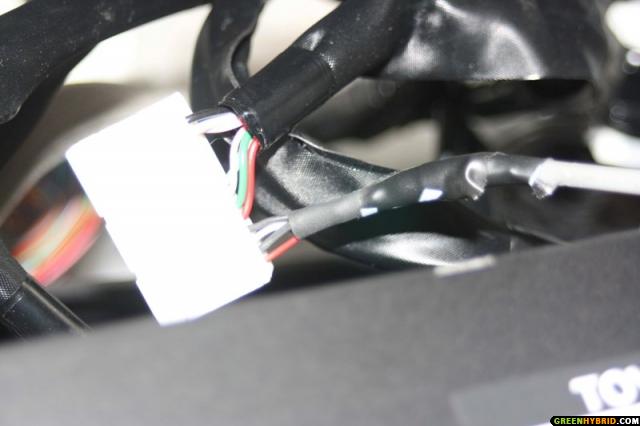
. I guess if I could find the R10 connector (interface) I could have the local company put it together...jagbagri installed his camera without using the "Y" cable. He used 4 wires that he removed from an old computer CD-ROM cable and spliced to the wires in the camera cable. He then inserted the 4 wires into the existing R10 connector. (see picture below)
fyi - The camera is available from Crutchfield. http://www.crutchfield.com/S-KxigcNy...sp?i=099BEC105. If you contact Crutchfield, they may have more info about the "Y" cable (aka toycam interface). Or, if you want, I can email you the name and phone number of the folk that did my camera installation.
Active Enthusiast
Joined: Sep 2006
Posts: 87
From: Raleigh, NC
Re: Back up Camrea installation to the NAV unt (with pictures)
jagbagri,
One more question for you, when you tried to get the camera to display while in drive, did you try going to the service screen and enabling the overide that allows you to manipulate the nav system while driving?
I am wondering wether if the camera is supplying video to the nav and the nav is in overide the nav system will display the camera video despite being in drive.
Thanks again for your time and experimentation,
Ham
One more question for you, when you tried to get the camera to display while in drive, did you try going to the service screen and enabling the overide that allows you to manipulate the nav system while driving?
I am wondering wether if the camera is supplying video to the nav and the nav is in overide the nav system will display the camera video despite being in drive.
Thanks again for your time and experimentation,
Ham
Pretty Darn Active Enthusiast
Joined: Dec 2006
Posts: 407
From: Out there somewhere
Re: Back up Camrea installation to the NAV unt (with pictures)
When my installer first attempted to install the camera, they realized that the connector on the end of the camera cable would not fit into the R10 connector on the rear of the nav unit. They called someone (I don't know who) for tech support, and learned there is a "Y" cable (toycam interface) that plugs into the R10 connector on the nav unit. The "Y" cable then connects to the original cable plugged into R10, and to the connector on the end of the camera cable. My installer ordered this cable via overnight delivery so that the installation could be completed.
jagbagri installed his camera without using the "Y" cable. He used 4 wires that he removed from an old computer CD-ROM cable and spliced to the wires in the camera cable. He then inserted the 4 wires into the existing R10 connector. (see picture below)
fyi - The camera is available from Crutchfield. http://www.crutchfield.com/S-KxigcNy...sp?i=099BEC105. If you contact Crutchfield, they may have more info about the "Y" cable (aka toycam interface). Or, if you want, I can email you the name and phone number of the folk that did my camera installation.
jagbagri installed his camera without using the "Y" cable. He used 4 wires that he removed from an old computer CD-ROM cable and spliced to the wires in the camera cable. He then inserted the 4 wires into the existing R10 connector. (see picture below)
fyi - The camera is available from Crutchfield. http://www.crutchfield.com/S-KxigcNy...sp?i=099BEC105. If you contact Crutchfield, they may have more info about the "Y" cable (aka toycam interface). Or, if you want, I can email you the name and phone number of the folk that did my camera installation.
Hey Walt...check you PM's
 . Thanks for the info





